
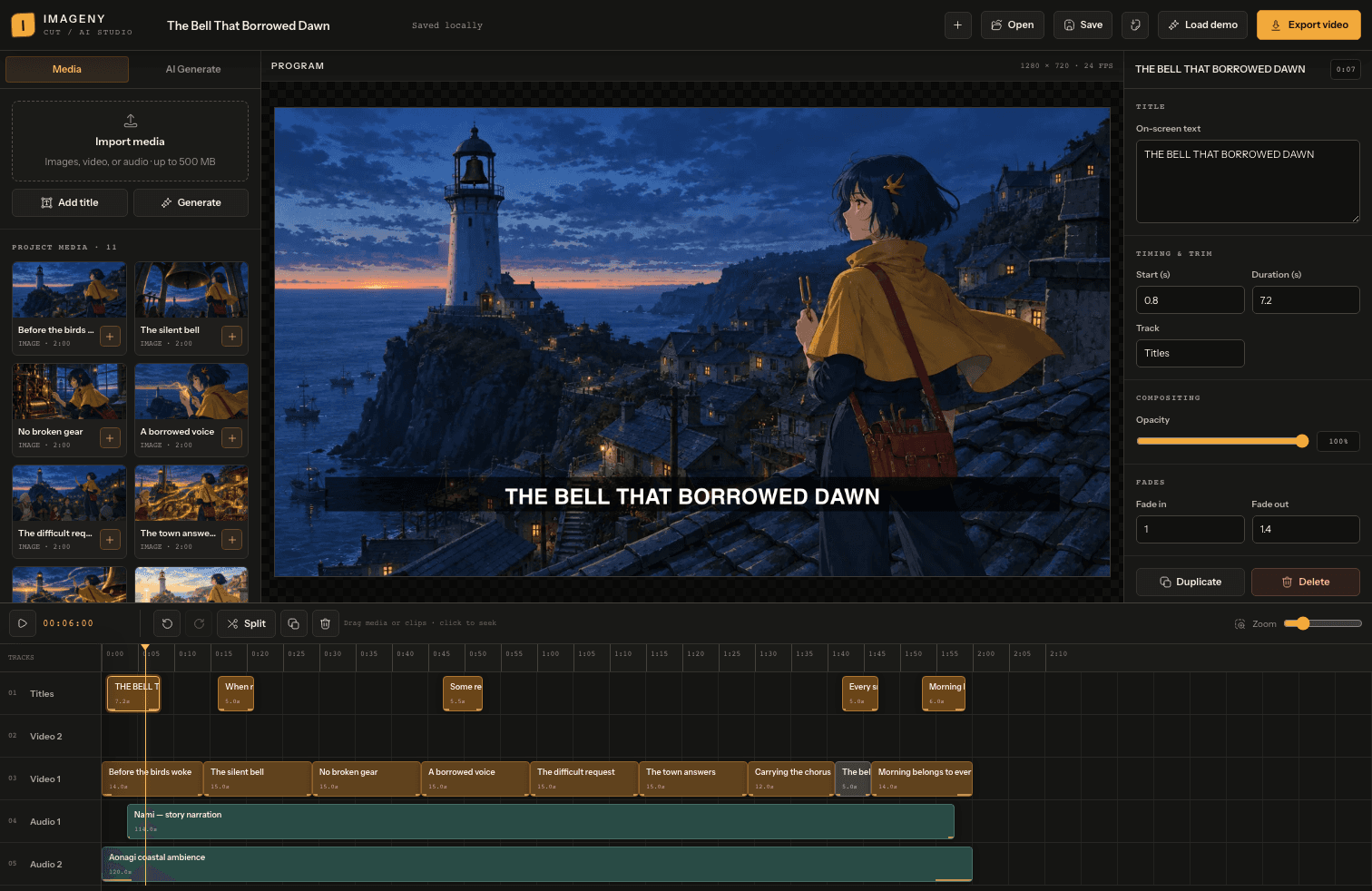
Your images can now become a complete video in Imageny. This September update brings a browser video editor, more control over image and video generation, and new ways to organize your work.
Here's what changed September 5–13.
New: turn your assets into a video
Open the video editor, import images, video clips, and audio, then arrange them on a timeline. Layer two visual tracks, mix two audio tracks with your clips' sound, and add titles above the picture.
- Shape the story. Trim, split, duplicate, and move clips to get the pacing you want. Undo and redo let you revisit an edit.
- Control the finish. Adjust titles, opacity, volume, and fades while previewing the sequence.
- Keep your project editable. Save it in your browser, or download a project file with its media included to back it up or move it to another computer.
- Export your cut. Download a WebM video. Export runs in real time, so keep the editor tab visible; use Chrome or Edge for the supported recording path.
Need another shot? The editor's Generate panel creates images and video using Imageny's model catalog. Choose a model, review its supported settings and credit cost, and the generated asset appears in your media library ready for the timeline. Import narration, music, or other audio through Import media; generic speech generation is not offered in the editor.
No provider setup or API key is required. The editor is available to signed-in users with credits or an active subscription; editing imported media or the included demo does not spend credits, while image and video generation uses the displayed Imageny credit amount.
Start with a two-minute story
Choose Load demo to open The Bell That Borrowed Dawn, an original anime about a clockmaker restoring her village's dawn bell. The project includes stills, a motion shot, narration, ambience, and editable titles. Change a title, try a different cut, or export the full two-minute film.
Open the editor and load the demo
Improved: more control in the playground
The playground now covers photography, illustration, cinematic scenes, pixel art, anime, and more. Choose a style or work directly from your prompt.
- Find a model that fits. Search image and video models by name or provider, with credit costs and capabilities shown in the picker. Settings follow the selected model's supported options.
- Build on a prompt. Use Enhance, Surprise me, and prompt history to explore ideas. Add reference images by upload, paste, URL, or a previous result.
- Take a result further. Remix an image to revisit its settings, or use Animate to start a video from it. Image batches let you compare up to four results at once.
New: collections for work you want to keep together
Group images and videos by project, character, or idea in collections. Add work from the playground or gallery, then rename collections or remove individual items as your project changes.
Updated: sign-in, themes, and everyday fixes
- Google sign-in is available on login and signup, with a retry option if the Google button fails to load.
- Light, Dark, and System themes are available from the site navigation. Your preference carries across visits, and the main app now shares the landing page's typography and palette.
- Narrow-screen layouts have improved navigation and controls across the studio and account screens.
- Shared image and video pages offer a retry action when loading fails. A new support page puts help within reach.
- The redesigned homepage explains the image-to-video workflow and how to get started. Account creation is free; generation in the playground uses Imageny credits from a subscription or credit pack. New accounts no longer receive a signup credit bonus.
Start with the demo, make a few edits, and see how the story changes: open the video editor.